Showing posts with label facebook. Show all posts

Sharing With Specific People on Facebook

Posted by Aamir khan


Lists give you an optional way to share with a specific audience. To share to a list:
You'll find an audience selector tool most places you share status updates, photos and other stuff. Depending on what type of phone you're using, tap the audience icon or click More Options to choose who you want to share something with.


1. Click the audience selector where you share your status update
2.Scroll down to the Friends List section and click the name of the list you want to share with...

for any kind of help join→ https://www.facebook.com/groups/mycomputerassist/ /*---google search--*/
More aboutSharing With Specific People on Facebook

Turn Firefox into A Facebook Messenger Officially

Posted by Aamir khan


Some Times ago i had posted a Video About Creating your Own Facebook Messenger in 30 Seconds
this was Actually Based on Firefox web Browser and I love to Work With Firefox perhaps this is not a Secure browser Read this for more info

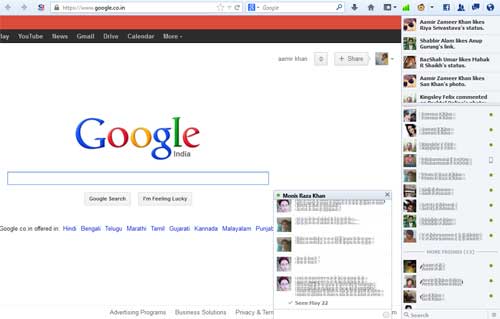
Facebook Messenger for Firefox lets you use Facebook right from your Firefox browser so you can continue your conversations wherever you go on the web.

You can also view your notifications, friend requests and messages by clicking the icons in the upper-right corner of Firefox.

the very Exiting Feature of this is "Desktop Notifications" no matter what Application or Window you have opened it will Notify you on your Desktop


You may Also Chat Directly on web page No matter what Web Site You have Opened


/*---google search--*/
More aboutTurn Firefox into A Facebook Messenger Officially

How To Hide Friend List On Facebook

Posted by Aamir khan

It is Very Simple To Hide Your friend List on Facebook
but many People Do not Know how to do that..

Last Night Some Of My Friends Asking the Same Question so i decide to make this Post.
it is very Simple to do that just follow the Steps...

step.1 Just Goto your Profile and Click On the Activity Log


Step.2 just Look at Left side panle Clikc Friends (Clickk More If its is not Present)

Step.3 Here it is just Simply Click on the Drop Down Menu And Choose Only Me and thats it now none cane see your Friend except you. so Enjoy


/*---google search--*/
More aboutHow To Hide Friend List On Facebook

The easiest way to check who unfriens you on facebook

Posted by Aamir khan

You might have seen several fake/spam messages which promises you to identify the person who unfriends you on facebook. But almost 99% of them takes the publishing rights to your facebook wall and keep spreading spam messages on you wall.
 but Nothing works 100%


Here i have found an Awesome web application that impress me in very effective way
so i going to share it with all of you...

it is easy to use it...
just Follow the steps.....

  • Go to www.outandin.info
  • Check on terms of use and click 'login with facebook'
  • It will ask some permissions, Click on allow.
  • That's it.
  •  you have Done.

  • i will request you to write your experience about all my post and articles plzz share your feedback in comment our Contact me by Clicking on Contact at header section of this post
you can also mention me @hacktw
hope you will help me to improve my Blog......
/*---google search--*/
More aboutThe easiest way to check who unfriens you on facebook

How To Enable Facebook Graph Search

Posted by Aamir khan

Facebook has Announce  a new search feature called as 'Graph Search', As its still an under development project, Its now available only for beta testers..


For Applying of Graph Search, Just Goto:
www.facebook.com/about/graphsearch
 
and click Join Waiting List at the bottom of that page.
After that Facebook will inform you when you can start using Facebook Graph Search.


/*---google search--*/
More aboutHow To Enable Facebook Graph Search

How to get free facebook Status feeds and photo likes

Posted by Aamir khan

/*---google search--*/
More aboutHow to get free facebook Status feeds and photo likes

Find out who visits your Facebook profile using Firefox

Posted by Aamir khan


iFamebook is  an Extension for Firefox that allows you to know who visits your Facebook profile!


HOW TO

1. Intall Mozila Firefox 
2. Install Ifamebook
3. check out the Icon At the top of the Page
4. Enjoy :p


Please Note:- You will see your friends visits only if they have iFamebook too.


/*---google search--*/
More aboutFind out who visits your Facebook profile using Firefox

FaceBook Color Alphabets Chat Codes

Posted by Aamir khan

[[107015582669715]] = A

[[116067591741123]] = B

[[115602405121532]] = C

[[112542438763744]] = D

[[115430438474268]] = E

[[109225112442557]] = F

[[111532845537326]] = G

[[111356865552629]] = H

[[109294689102123]] = I

[[126362660720793]] = J

[[116651741681944]] = K

[[115807951764667]] = L

[[106596672714242]] = M

[[108634132504932]] = N

[[116564658357124]] = O

[[111669128857397]] = P

[[107061805996548]] = Q

[[106699962703083]] = R

[[115927268419031]] = S

[[112669162092780]] = T

[[108983579135532]] = U

[[107023745999320]] = V

[[106678406038354]] = W

[[116740548336581]] = X

[[112416755444217]] = Y

[[165724910215]]    = Z
/*---google search--*/
More aboutFaceBook Color Alphabets Chat Codes

Up coming New look of Facebook in 2012

Posted by Aamir khan

Goto https://www.facebook.com/about/timeline to learn all about it....

/*---google search--*/
More aboutUp coming New look of Facebook in 2012

FACEBOOK CHAT EMOTIONS TRICK(CREATE YOUR OWN EMOTIONS WTH ALT+ KEY)

Posted by Aamir khan


FACEBOOK IS A VERY POPULAR SOCIAL NETWORKING SITE LIKE YAHOO,ORKUT WHERE PEOPLE CHAT AND HAVE FUN BUT  THINK THERE SOMETHING MISSING ON FACEBOOK LIKE YAHOO,OR OTHER STIES AND THAT IS CHAT EMOTIONS BUT HERE A V.COOL WAY TO CREATE THEM MANY PEOPLE DO NOT KNOW ABOUT IT ITS VERY EASY TO DO THAT
JUST HOLD ALT AND PRESS SPECIAL CODE ON YOUR KEY BOARD LIKE ALT+14=♫
HERE ARE THE CODES THAT U CAN USE
ALT  1 = ☺
ALT 2  = ☻
ALT 3 = ♥
ALT  4 = ♦
ALT 5 = ♣
ALT 6 = ♠
ALT 7 = •
ALT 8 = ◘
ALT 9 = ○
ALT 10 = ◙
ALT 11 = ♂
ALT 12 = ♀
ALT 13 = ♪
ALT 14 = ♫
ALT 15 = ☼
ALT 16 = ►
ALT 17 = ◄
ALT 18 = ↕
ALT 19 = ‼
ALT 20 = ¶
ALT 21 = §
ALT 22 = ▬
ALT 23 = ↨
ALT 24 = ↑
ALT 25 = ↓
ALT 26 = →
ALT 27 = ←
ALT 28 = ∟
ALT 29 = ↔
ALT 30 = ▲
ALT 31 = ▼
ALT 32 =  (space)
ALT 33 = !
ALT 34 = "
ALT 35 = #
ALT 36 = "
ALT 37 = %
ALT 38 = &
ALT 39 = '
ALT 40 = (
ALT 41 = )
ALT 42 = *
ALT 43 = +
ALT 44 = ,
ALT 45 = -
ALT 46 = .
ALT 47 = /
ALT 48 = 0
ALT 49 = 1
ALT 40 = 2
ALT 51 = 3
ALT 52 = 4
ALT 53 = 5
ALT 54 = 6
ALT 55 = 7
ALT 56 = 8
ALT 57 = 9
ALT 58 = :
ALT 59 = ;
ALT 60 = <
ALT 61 = =
ALT 62 = >
ALT 63 = ?
ALT 64 = @
ALT 65 = A
ALT 66 = B
ALT 67 = C
ALT 68 = D
ALT 69 = E
ALT 70 = F
ALT 71 = G
ALT 72 = H
ALT 73 = I
ALT 74 = J
ALT 75 = N
ALT 76 = L
ALT 77 = M
ALT 78 = N
ALT 79 = O
ALT 80 = P
ALT 81 = Q
ALT 82 = R
ALT 83 = S
ALT 84 = T
ALT 85 = U
ALT 86 = V
ALT 87 = W
ALT 88 = X
ALT 89 = Y
ALT 90 = Z
ALT 91 = [
ALT 92 = \
ALT 93 = ]
ALT 94 = ^
ALT 95 = _
ALT 96 = `
ALT 97 = a
ALT 98 = b
ALT 99 = c
ALT 100 = d
ALT 101 = e
ALT 102 = f
ALT 103 = g
ALT 104 = h
ALT 105 = i
ALT 106 = j
ALT 107 = k
ALT 108 = l
ALT 108 = m
ALT 100 = d
ALT 111 = o
ALT 112 = p
ALT 113 = q
ALT 114 = r
ALT 115 = s
ALT 116 = t
ALT 117 = u
ALT 118 = v
ALT 119 = w
ALT 110 = n
ALT 121 = y
ALT 122 = z
ALT 123 = {
ALT 124 = |
ALT 125 = }
ALT 126 = ~
ALT 127 = 
ALT 128 = Ç
ALT 129 = ü
ALT 120 = x
ALT 130 = é
ALT 131 = â
ALT 132 = ä
ALT 133 = à
ALT 134 = å
ALT 135 = ç
ALT 136 = ê
ALT 137 = ë
ALT 138 = è
ALT 139 = ï
ALT 141 =  ì
ALT 142 = Ä
ALT 143 = Å
ALT 144 = É
ALT 145 = æ
ALT 146 = Æ
ALT 147 = ô
ALT 148 = ö
ALT 149 = ¦
ALT 140 = î
ALT 151 = ù
ALT 152 = ÿ
ALT 153 = Ö
ALT 154 = Ü
ALT 155 = ¢
ALT 156 = £
ALT 157 = ¥
ALT 158 = P
ALT 159 = ƒ
ALT 150 = û
ALT 161 = í
ALT 162 = ó
ALT 163 = ú
ALT 164 = ñ
ALT 165 = Ñ
ALT 166 = ª
ALT 167 = º
ALT 168 = ¿
ALT 169 = _
ALT 160 = á
ALT 171 = ½
ALT 172 = ¼
ALT 173 = ¡
ALT 174 = «
ALT 175 = »
ALT 176 = _
ALT 177 = _
ALT 178 = _
ALT 179 = ¦
ALT 170 = ¬
ALT 181 = ¦
ALT 182 = ¦
ALT 183 = +
ALT 184 = +
ALT 185 = ¦
ALT 186 = ¦
ALT 187 = +
ALT 188 = +
ALT 189 = +
ALT 180 =  ¦
ALT 191 = +
ALT 192 = +
ALT 193 = -
ALT 194 = -
ALT 195 = +
ALT 196 = -
ALT 197 = +
ALT 198 = ¦
ALT 199 = ¦
ALT 190 = +
ALT 200 = +
ALT 201 = +
ALT 202 = -
ALT 203 = -
ALT 204 = ¦
ALT 205 = -
ALT 206 = +
ALT 207 = -
ALT 208 = -
ALT 209 = -
ALT 210 = -
ALT
 211 = ╙
ALT 212 =╘
ALT 213 = ╒
ALT 214 = ╓
ALT 215 = ╫
ALT 216 = ╪
ALT 217 = ┘
ALT 218 = ┌
ALT 219 = █
ALT 220 = ▄
ALT 221 = ▌
ALT 222 = ▐
ALT 223 = ▀
ALT 224 = α
ALT 225 = ß
ALT 226 = Γ
ALT 227 = π
ALT 228 = Σ
ALT 229 = σ
ALT 230 = µ
ALT 231 = τ
ALT 232 = Φ
ALT 233 = Θ
ALT 234 = Ω
ALT 235 = δ
ALT 236 = ∞
ALT 237 = φ
ALT 238 = ε
ALT 239 = ∩
ALT 240 = ≡
ALT 241 = ±
ALT 242 = ≥
ALT 243 = ≤
ALT 244 = ⌠
ALT 245 = ⌡
ALT 246 = ÷
ALT 247 = ≈
ALT 248 = °
ALT 249 = ∙
ALT 250 = ·
ALT 251 = √
ALT 252 = ⁿ
ALT 253 = ²
ALT 254 = ■
ALT 255 = (space)
ALT 256 = (nothing)
ALT 257 = ☺
ALT 258 = ☻
ALT 259 = ♥
ALT 260 = ♦
ALT 261 = ♣
ALT 262 = ♠
ALT 263 = •
ALT 264 = ◘
ALT 265 = ○
ALT 266 = ◙
ALT 267 = ♂
ALT 268 = ♀
ALT 269 = ♪
ALT 270 = ♫
ALT 271 = ☼
ALT 272 = ►
ALT 273 = ◄
ALT 274 = ↕
ALT 275 = ‼
ALT 276 = ¶
ALT 277 = §
ALT 278 = ▬
ALT 279 = ↨
ALT 280 = ↑
ALT 281 = ↓
ALT 282 = →
ALT 283 = ←
ALT 284 = ∟
ALT 285 = ↔
ALT 286 = ▲
ALT 287 = ▼
ALT 288 =  (space)
ALT 289 = !
ALT 290 = "
ALT 291 = #
ALT 292 = $
ALT 293 = %
ALT 294 = &
ALT 295 = '
ALT 296 = (
ALT 297 = )
ALT 298 = *
ALT 299 = +
ALT 300 =  , 
HAVE FUNN AND HERE I WANT TO SHARE SOMETHNG WITH YOU THAT IS MY FACEBOOK GROUP JOIN US  HERE
/*---google search--*/
More aboutFACEBOOK CHAT EMOTIONS TRICK(CREATE YOUR OWN EMOTIONS WTH ALT+ KEY)

Usefull facebook shortcuts.

Posted by Aamir khan


Most of us have an account on
Facebook.
Productivity Gurus
keep telling us that Facebook
and Twitter are a waste of time,
but we still keep going there to
socialize with our online buddies.
So, if you are going to use
Facebook anyway, why not use
keyboard shortcuts to save
some time. 

Here ’s a list of very
useful Facebook shortcuts.


Alt+M Send a New Message by opening
the Send Message dialog box

Alt+/ Move cursor to the search box
at top

Alt+1 Go back to home page

Alt+2 Go to your profile page

Alt+3 Accept/Deny a friend request

Alt+4 Go to messages page

Alt+5 Open notifications tab at top

Alt+6 Go to account settings page

Alt+7 Go to privacy settings page

Alt+8 Open the fan page for Facebook,

http://www.facebook.com/
hackbookk


I know its not very
useful but we are all fans of
Facebook here smile

Do you know about any other
useful Facebook shortcut?

Fire them in comment-Aamir
/*---google search--*/
More aboutUsefull facebook shortcuts.

Recover your Facebook Account using your friends

Posted by Aamir khan


Use Trusted Friends to Recover your Facebook Account


Trusted Friends is one of the other useful security related feature of Facebook that some of us may not be aware of 
You choose any 3-5 friends, who you trust, and Facebook will send them recovery instructions for your account in the worst case scenario where you have forgotten your Facebook password and have also lost access to your email accounts and your mobile phone.
To set up a trusted friends list for your Facebook account, go to your Account Settings –> Security –> Trusted Friends and pick any 3-5 close friends.
If you ever get locked out of our account, Facebook will send recovery codes to all thesetrusted friends. Next you need to call your friends, collect the codes and submit them to Facebook. After you submit the security codes, you'll have to wait for 24-hours before you can log into Facebook again.
/*---google search--*/
More aboutRecover your Facebook Account using your friends

Add a Subscribe Button to your Facebook Profile

Posted by Aamir khan


Facebook has just added a new option to profile pages that would let people “subscribe” to your profile just like the way people follow you on Twitter. Whenever you post an update on Facebook with the privacy set as “public,” it will appear in the news stream of your subscribers. To put this in more simple terms, Subscribe is to Facebook profiles what Like is to Facebook pages.

The only difference is that you get each and update when your “like” a Facebook page whereas you only get public updates when your “subscribe” to a Facebook profile. You can subscribe to my public Facebook updates at facebook.com/mohd.aamir.khan.yousufzai. Add the Subscribe option to your Facebook Profile If you would like to add the Subscribe button to your own Facebook profile, go here.

Before you do that, it may be a good idea to double-check that only stuff that you really want to share with non-friends is public. To confirm, go your Facebook profile page, hit the “View As” button and then click the “public” link to see what updates in your profile are public.

You can have unlimited number of subscribers to your profile but you can subscribe to a maximum of 5,000 profiles. You can download this PDF, courtesy the Facebook Public Figures page, to learn more about the new Subscribe option and how it differs from a regular Facebook page. On a related note, Facebook is using the standard RSS icon with the new Subscribe feature which is confusing because, technically, these aren’t really RSS feeds – you can’t get them in, say, Google Reader.

facebook profile vs page
/*---google search--*/
More aboutAdd a Subscribe Button to your Facebook Profile

how to create facebook messenger in 30 seconds?

Posted by Aamir khan


/*---google search--*/
More abouthow to create facebook messenger in 30 seconds?

Facebook introducing Messenger, A Faster Way to facebook Message on Mobile

Posted by Aamir khan

.
 introducing Messenger, a new mobile app that simplifies how messaging works, and gives you a faster way to message friends and small groups.

A whole new app

Messenger is a separate app, so it only takes one click to get to your messages or send a new one. Messages are delivered through notifications and texts, so your friends are more likely to get them right away.

You can use Messenger to reach all of your friends -- whether they're on Facebook or in your phone contacts. All you have to do is type the person's name.


The Messenger app is an extension of Facebook messages, so all your conversations are in one place, including your texts, chats, emails and messages. Whether you're on your phone or on the web, you can see the full history of all your messages.

Make plans with groups

When you're on the go, coordinating a bunch of people can be tricky, especially if plans change at the last minute. With Messenger, you can quickly start a group conversation and message everyone at once.

If you choose to add your location, the people you're messaging with can easily find each other on the map. You can also attach photos, so everyone else can see and comment on what you're looking at.


How to get Messenger

Messenger will be available for both iPhone and Android starting today. Just search for "Facebook Messenger" in your phone's app store, or get a link to the app texted to your phone.

/*---google search--*/
More aboutFacebook introducing Messenger, A Faster Way to facebook Message on Mobile

FlipToast - Best Desktop App for Facebook

Posted by Aamir khan


You might have downloaded many desktop applications fro Facebook for easy social browsing and connectivity but every time you discover some bugs in that application and sometimes it crashes too but today I found a very useful application for Facebook which is easy to use and properly configured for your desktop.
FlipToast - Best Desktop Application for Facebook

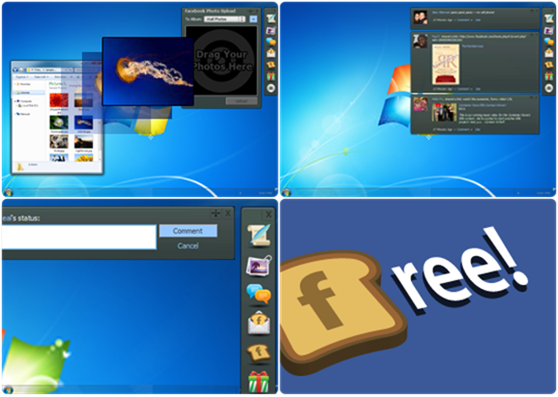
FlipToast is the desktop application for Facebook which provides a very interactive user interface to interact with all your friends on Facebook. It provides an easy way to update your status right from your desktop, upload images to any Facebook Album you created or it also have an option to create a new Facebook Album.
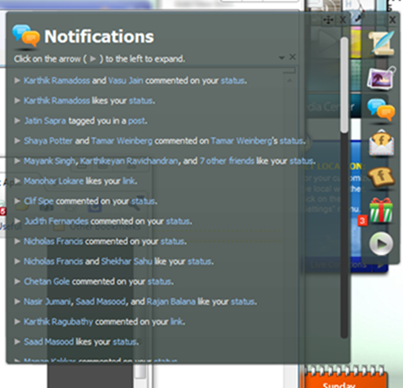
Notification are really amazing as you are doing your work notifications will interact with you to tell you all the latest stuff happing on Facebook.
FlipToast - Best Desktop Application for Facebook
So now simply go to FlipToast website and download the application install it and use it to have fun on Facebook really in an easy way.

Facebook App to protect your reputation
                 Trick to Install theme on Facebook
/*---google search--*/
More aboutFlipToast - Best Desktop App for Facebook

Operation Facebook- Hackers Aims to Destroy Facebook on Nov. 5

Posted by Aamir khan


The Hackivist group Anonymous that has released the information of w Enforc US laement websites and many other activities has been reported by this group. The group anonymous aim to destroy facebook on November 5th 2011. Remember this is not a small group they have previously did different difficult hacking attack on the most secure server. 


Anonymous activity shows that they are believing on mass attack, In April, Sony announced that members of Anonymous were in large part responsible for successfully hacking into the PlayStation Network. They have launched several operation for different companies, Govt of a Country and even for services. They want freedom, a freedom of speech.


The news operation that has been launched by anonymous called Operation facebook and the main aim is to destroy Facebook by 
 
 
5th. However on a recent tweet they wrote that:

#OpFacebook is being organised by some Anons. This does not necessarily mean that all of #Anonymous agrees with it.
They have released a video about Operation facebook and in this they claim that “Facebook know more about you than your family and friends” and “Facebook has been selling information to government agencies and giving clandestine access to information security firms so that they can spy on people from all around the world. Some of these so-called whitehat infosec firms are working for authoritarian governments, such as those of Egypt and Syria”. 


Their statement is clear and they usually use a signature:
We are anonymous
We are legion
We do not forgive
We do not forget
Expect us


/*---google search--*/
More aboutOperation Facebook- Hackers Aims to Destroy Facebook on Nov. 5

Copy, Paste & Facebook Hack!!!

Posted by Aamir khan

/*---google search--*/
More aboutCopy, Paste & Facebook Hack!!!

facebook chat emotions!!

Posted by Aamir khan

facebook-chat-penguin-emoticon
Facebook chat penguin emoticon – <(")
The newest Facebook emoticon, and probably also the cutest! The super penguin Facebook chat emoticon is the one to send to your girlfriend if she asks for a present!


facebook chat emoticons woot Facebook chat woot emoticon – O.o
If you can’t believe what the person you’re talking to just said, give them a w000t face! They’ll soon realise you’re suprise!

facebook chat emoticons wink kiss
Facebook chat kiss emoticon – :*
The first of the romantic emoticons to use in your chats – the kiss also incorporates a small wink!


facebook chat emoticons wink
Facebook chat wink emoticon – ;)
A cute wink can deliver any number of different meanings – just remember if you’re going to send it to your crush, make sure your girlfriend or boyfriend isn’t watching!


facebook chat emoticons tongue
Facebook chat tongue emoticon – :p
Sticking out your tongue in some cultures can be very offensive, however if it’s a Facebook chat emoticon I think you won’t be sent to prison (yet!).


facebook chat emoticons sunglasses
Facebook chat sunglasses emoticon – 8-|
My future’s so bright, I have to wear shades! But I will never wear them indoors – only movie stars do that!

facebook chat emoticons smiler
Facebook chat smiling emoticon – :)
The classic smiling icon, for use to show how happy you are with your life!

facebook chat emoticons smile
Facebook chat happy eyes emoticon – ^_^
Inspired by Japanese manga, this ‘happy eyes’ emoticon is a good way of showing your complete contentment with somebody close.

facebook chat emoticons sad
Facebook chat sad face emoticon – :(
Did someone say something to upset you? Show your displeasure with this Facebook chat sad emoticon.

facebook chat emoticons robot
Facebook chat robot emoticon – :|]
Do they robot! Show everyone you haven’t forgotten how to breakdance by adding a robot into your chats!


facebook chat emoticons putnam
Facebook chat Putnam emoticon – :putnam:
There was a lot of controversy when this emoticon was first seen in Facebook chat – it turned out to be the face of Facebook engineer Chris Putnam.


facebook chat emoticons heart
Facebook chat heart emoticon – <3
Another romantic Facebook chat emoticon, this love heart can have your boyfriend or girlfriend eating out of the palm of your hand (maybe!).

facebook chat emoticons pacman
Facebook chat pacman emoticon – :v
As described previously, this throwback emoticon is one of the most popular (especially among those Facebook users who were not born in the 1990s!).

facebook chat emoticons glasses
Facebook chat glasses emoticon – 8)
People with glasses are often discriminated against when they are growing up, but now glasses are seen as a fashion item (and people who don’t need them wear them!). Try it for yourself with this glasses smiley.


facebook chat emoticons gasp
Facebook chat gasp emoticon – :o
Another shocked face to show your friends that you have no idea why they would say what they just said!

facebook chat emoticons errr
Facebook chat errr emoticon – :/
Errr I think you need to rethink what you just said, because it makes no sense!


facebook chat emoticons doh
Facebook chat doh emoticon – >:-(

Doh! I can’t believe you’re so stupid!

facebook chat emoticons devil
Facebook chat devil emoticon – 3:)
Is it a sexy emoticon or an evil emoticon? With Halloween coming up, the devil emoticon might be one of the most useful in your chat arsenal!


facebook chat emoticons crying
Facebook chat crying emoticon – :’(
Don’t cry, just pretend to (using this smilie!). Whoever you’re talking to will soon change their mind about whatever they did or said!

facebook chat emoticons cat smile
Facebook chat cat smile emoticon – :3
Never has a man looked so content as this one!

facebook chat emoticons big smile
Facebook chat big smile emoticon – :D
Another classic Facebook chat emoticon, the bigggg smile which can let everyone know how absolutely ecstatic you are!

facebook chat emoticons angel
Facebook chat angel emoticon – O:)
The last (but not least) emoticon, the angel, can show your pure and wholesome side (if you need help in convincing people!).


facebook red 42 emoticon
Facebook Red 42 emoticon – :42:
/*---google search--*/
More aboutfacebook chat emotions!!

..-

Related Posts Plugin for WordPress, Blogger...

If you like this blog,then link back to me.
This is what you will see.


Optionally use this Widget installer to add this link to your blogger blog.