Showing posts with label Tips and Tricks. Show all posts

Turn your Email into delightful feedback forms

Posted by Aamir khan

How to create a Contact us page for my blog?

This is the FAQ in new bloggers. Many People now a days doing blogging not even knowing nut shell of Blogging such as how to change Themes of a blog or how to add a widget on their blog..

In the Same way they Do not have knowledge of any web oriented programing language which is not obligatory but Helpful in many ways  such as creating a Contact us page..

Our today's post for all those people who fits in the second paragraph
So here is a very nice tool called squaresend which allow you to use your inbox as a web guest book..


Sound interesting but How? 


Just follow the Steps...

1. Sing up for https://squaresend.com/

2. Grab the Script and Place it where ever you want to add the form  
<script src="https://squaresend.com/squaresend.js"></script> 

3. Authorize your mail by Squaresen (Authorizing an email simply means telling Squaresend to accept messages sent to it through the Squaresend interface. When you sign up for Squaresend, your initial email will automatically be authorized.)

4. Put the Link where you want to show the Button or link.
this is the Demo Link
<a href="mailto:contact@example.com?sqs_title=Leave+us+a+message!">

5. See Docs for Comprehensive API Reference http://squaresend.com/docs

6. See a Typical DEMO here and Have Fun....

/*---google search--*/
More aboutTurn your Email into delightful feedback forms

How to Set up Gmail with Sea Monkey

Posted by Aamir khan

Guide to Set up Sea Monkey With Gmail by Aamir Khan

/*---google search--*/
More aboutHow to Set up Gmail with Sea Monkey

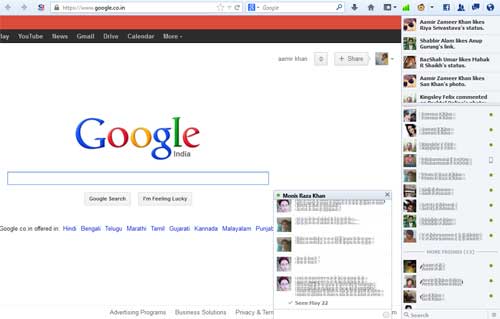
Turn Firefox into A Facebook Messenger Officially

Posted by Aamir khan


Some Times ago i had posted a Video About Creating your Own Facebook Messenger in 30 Seconds
this was Actually Based on Firefox web Browser and I love to Work With Firefox perhaps this is not a Secure browser Read this for more info

Facebook Messenger for Firefox lets you use Facebook right from your Firefox browser so you can continue your conversations wherever you go on the web.

You can also view your notifications, friend requests and messages by clicking the icons in the upper-right corner of Firefox.

the very Exiting Feature of this is "Desktop Notifications" no matter what Application or Window you have opened it will Notify you on your Desktop


You may Also Chat Directly on web page No matter what Web Site You have Opened


/*---google search--*/
More aboutTurn Firefox into A Facebook Messenger Officially

Simple Blogger: A Desktop Client for Blogger

Posted by Aamir khan


As a Blogger sometimes it is Very irritating for me while my internet connection is down and i need to post an article on my blog...because blogger takes too much time to load with slow connection..
but now i have got this solution it is very simple, Fast and Easy to post a new Article on my blog Without opening Blogger

Blogger Dashboard

Simple Blogger is a small and very easy to use application that enables you to quickly write and publish a new post of your blog. Avaible in Windows and Linux. Simple Blogger has written on Python with wxPython


Features


  • Make post to your Blogger
  • Labels support
  • Local draft support
  • Automatically adds all your blogs from Google account
  • Tag templates
  • Upload image to Picasa web service
  • Image scale and align
  • Cross platform
  • Portable

Download


/*---google search--*/
More aboutSimple Blogger: A Desktop Client for Blogger

How To generate a Html File List from a Folder eg. songs, images etc

Posted by Aamir khan


Sometimes we need to Write a Long table for Web pages
Specially if own a Music Web Site....
many times i need to generate a long list of my folder's Files
so it takes too much Time to Write the list .
but here i have Found a very tiny tool Called dirhtml


 Dirhtml builds customizable html files from a folder branch using the gui or command line.
It runs on Windows NT/2000/XP/Vista/Win7/Win8 and via Wine on most linux distributions.

Have A Look at Generated Sample
/*---google search--*/
More aboutHow To generate a Html File List from a Folder eg. songs, images etc

How To Know All the info about a Video ?

Posted by Aamir khan


Some times i make some videos (tutorials) then try to Convert them .
the only problem i got is about the codec of videoand many of my friends ask me about it.
so i make some searches on web and find the best Solution is Media info

MediaInfo is a convenient unified display of the most relevant technical and tag data for video and audio files. it is an Open Source Software... and if you are using K-Lite Codec Pack you will Find Media-info Inbuilt With new GUI


Personally i like the K-lite Inbuilt GUI Media Info
and i have to it Since i am Using K-lite Codec Pack.....
you may try Both of them and Decide which one is better....
/*---google search--*/
More aboutHow To Know All the info about a Video ?

Kruti Dev Special Symbols Characters and Codes

Posted by Aamir khan

Character Map


Kruti Dev Is A very Popular Hindi Font that Mostly Use by Office Worker or Hindi News Papers.........
it is a standard font for many of the states government in India.
Many People asked me to write about kruti Dev so this article dedicated all of them


Chosse the Type Of Help


If you people Still having any problem so feel free to ask me
i will try my Best to Give you the Satisfaction.
/*---google search--*/
More aboutKruti Dev Special Symbols Characters and Codes

How To Create a Ghosty Text effect in Sony Vegas

Posted by Aamir khan

/*---google search--*/
More aboutHow To Create a Ghosty Text effect in Sony Vegas

How to know when someone tweet your blog post on twitter

Posted by Aamir khan


Twitter Search is pretty useless forego surfing – that’s because all hyperlinks on Twitter are in the form of short URLs
so you’ll never know if that TinyURL link is pointing to you or someone else’s blog.

There’s however an excellent third-party alternative in the form of TweetBeep 
that can help you here
this tool regularly checks for mentions of your website on twitter even if the links have been shortened using TinyURL, Snurl or other URL shortening services.
As soon as someone publishes a tweet that refers to any of your blog pages,
TweetBeep will send you an email alert

/*---google search--*/
More aboutHow to know when someone tweet your blog post on twitter

Making More Money With Simple Script Hack on Chitika

Posted by Aamir khan

Since Chitika now supports channels (SID) , we can use this technique to determine the best Chitika keywords that have a higher CTR as well as eCPM.

Here we have written a simple hack to determine the top paying keywords in Chitika eMinimalls. Since this hack only extends the existing channel names, we will still be able to track which Chitika interactive unit was clicked by the user.

All you need to do is add one more line of code to your Chitika Javascript code.

<script type="text/javascript"><!--
ch_client = "chitika-login";
ch_width = 468;
ch_height = 60;
ch_sid = "left sidebar"; // Chitika Channel Name
var ch_queries = new Array( "cameras", "ipod", "xbox", "laptop" );
var ch_selected=Math.floor((Math.random()*ch_queries.length));
ch_query = ch_queries[ch_selected];
ch_sid += " " + ch_query;
//--></script>
<script src="http://scripts.chitika.net/eminimalls/mm.js" type="text/javascript">
</script>


The variable ch_sid holds the SID level/channel name. We have just extended the channel name to include the product name. Once this is enabled, your Chitika eMiniMalls reports will show data for "channel name" + "product name". So you will easily know which keywords are performing best and remove the ones that are low paying or receive no clicks at all.

Chitika Customer service are doing an excellent job. They sometimes reply to your queries in few seconds.

Amit made a few changes in the above code based on Michelle (Chitika Customer Service) advice.

1) The semicolon was missing in the first ch_sid. This can lead to javascript errors on some browsers. Also Amit added // before the "Chitika Channel Name". (since people tend to blindly copy the code. If there is a comment atleast the code wont break)

2) Nitpicky thing: changed the repeated ch_queries[ch_selected] to ch_query (and saved 1 nanosecond to avoid the array reference! :-)
/*---google search--*/
More aboutMaking More Money With Simple Script Hack on Chitika

Ads Networks Similar to Google Adsense

Posted by Aamir khan

Recommended
Chitika
Bidvertider

Primarily CPM Based Ad Networks
121Media
24/7 RealMedia
Accelerator-Media
Ad Solutions Network
Ad World Network
AdAgency1
AdBonus
AdDynamix / Pennyweb Networks
AdOrigin
AdPepper
AdSmart
Adtegrity
AdZuba
Ampira Media
Bannerconnect
BannerSpace
BlueLithium
BURST! Media
Casale Media
Claxon Media
Click Agents
CPX Interactive (Formerly Buds Media)


EuroClick
Experclick
FastClick/ValueClick
Federated Media
Gold Group
Gorilla Nation Media
Hurricane Digital Media
Impression|Up
InterClick
Interevco (Interactive Revenue Company Ltd.)
Joetec
Mamma Media / FocusIn
MaxOnline
Oridian
Premium Network
Quake Marketing
Quin Street
RealCastMedia
RealTechNetwork
Revenue.net
Right Media
Rydium
The Robert Sherman Company
TMP
Tribal Fusion
Valuead.com
Yes Advertising
HyperBidder

Primarily CPA/CPL Ad Networks
Advertising.com
Amazon.com
Axill
Azoogle Ads
ClickBank
ClickBooth
ClickXChange
Commission Junction / BeFree
CoverClicks
DarkBlue
DrivePM
emarketmakers
Linkshare
Maxbounty
Meta Reward
ProfitCenter
Revenue.Net
ShareASale
Strategic Affiliates
WebSponsors

Primarily CPC AND/OR Text Based/Contextual Ad Networks

Google AdSense
Yahoo! Publisher Network
AdForce
AdHearUs
AdKnowledge
AdSonar
Affiliate Sensor
All Clicks
AllFeeds
BannerBoxes
BClick
BidClix
Bidvertiser
CBprosense
Clicksor
ExpoActive
IndustryBrains
Mirago
Miva
Nixxie
One Monkey
Oxado
TargetPoint
Textads Dot Biz
TextWise
Text Link Ads
Vibrant Media
WebAdvertising.ca
AdBright

Shopping/Comparison Networks

TTZ Media
PriceGrabber
Chitika
Shopping.com
CNet Shopper

“Non-Standard” Ad Networks (PopUps, Expandables, Pay Per Post, etc.)

7AdPower
Opt-Media
PayPopUp
PointRoll
PopUpTraffic
Tremor Network
WhenU
PayPerPost
ReviewMe
CreamAid

Specific Demographic Ad Networks

Absolute Agency
AVN Ads (*****WARNING: ADULT NETWORK*****)
BlogAds
CrispAds Blog Advertising Network
HerAgency
HispanoClick
Pheedo RSS & Weblog Marketing Solutions
Qumana Adgenta Blog Ads
WayPointCash (*****WARNING: ADULT NETWORK*****)

NON-US Primarily CPM Based Ad Networks

ClickHype
DMO Global

NON-US Primarily CPC AND/OR Text Based/Contextual Ad Networks

Response Republic
PeakClick

NON-US Primarily CPA/CPL Ad Networks
TradeDoubler
Commission Monster
Affiliate Future
AdLink
/*---google search--*/
More aboutAds Networks Similar to Google Adsense

Use Email to Convert Files into Different Formats

Posted by Aamir khan


There exist quite a few online services that let you convert files from one format to another. You upload the source file, specify the output format and within seconds, the converted file in the desired format becomes available for download. That’s easy but there are somes limitations with this approach:

When you want to convert a file, you have to upload it to the file conversion service. This is not an issue when you are converting files from the desktop but how do you upload files from iPhone, Android or any other mobile browser.
Sometimes clients will send you files in obscure formats as email attachments. In order to convert those files in a format that your apps can understand, you will download the attachments to your desktop and then upload them to the file conversion service. That’s work.
Zamzar, a popular tool for converting files online, has added a new option that lets you convert files by email itself. You can forward your email attachments directly to Zamzar, without downloading them to the desktop, and they’ll be converted in no time.


Convert Email attachment into Different File Formats
To get started, you need to forward the input (source) files to a specific email address like format@zamzar.com where format represents the file type of the desired output format.

For instance, if you have a Word document that you want to convert to PDF, you can send the file as an email attachment to pdf@zamzar.com. If you have a PDF file that you want to convert into an ebook, the corresponding conversion address would be epub@zamzar.com or mobi@zamzar.com depending on your ebook reader.

Here’s a complete list of input-output file formats that are currently supported by Zamzar. You can convert documents, presentations, ebooks, videos, audio files, archives and more.

In my test, the converted files were delivered quickly and the quality of the converted files was impressive. There’s no need to create any account at Zamzar and you can convert files up to 1 MB in a single batch. You may go for a pro account to convert bigger files that starts from $7 per month.

One more thing. You can only upload files by email and initiate the conversion process but you’ll still have to visit the Zamzar website to download the converted file. It stays on Zamzar servers for about a day and their download page is actually very confusing when accessed on a mobile phone.


/*---google search--*/
More aboutUse Email to Convert Files into Different Formats

10 Things notto DO on a First Date ♥...

Posted by Aamir khan


As an old saying goes, "first impression is the last impression".

One has to subscribe to this saying when going on a first date. Here are 10 things you should absolutely avoid doing on a first date.


   1. Be a braggadocio


A braggadocio is a person who boasts about his own deeds irrespective of the response from the other person. Such kinds of empty pretentious bragging can be an anti-climax. So, avoid boasting about yourself in a bid to leave a pleasant impression on your date.


 2. Mention past relationships


Broaching the subject of a past relationship could prove to be a speed breaker in your rendezvous. You will get ample of time to talk about the past. You needs to realize that the girl wants to move over her past. Don't be a victim of the circumstances instead be a master of it. After all nobody wants to spend his/her first date wiping tears.


  3. Eat like a glutton


This means: do not end up going on a date when you are ravenously hungry. The objective of a date is to have a pleasant conversation. Eating is an excuse for the date. It is embarrassing and awkward to talk while eating. It is better if you adhere to one activity at a time.


4. Act nervous


This could be a tough task; it is crucial to realize that women like confident men. Assertiveness will help you score some brownie points on a first date. An amalgamation of confidence and sense of humour is an ideal recipe for a nice date.


5. Money can't buy love!

Talking about money will project your image as selfish and self centered who equates everything in terms of money. It can paint your image as someone who is deficient of emotions. This could affect the equilibrium of a relationship in the long run as your show-off may appear condescending.


6. Fiddle with your phone


There are two reasons for this. Talking or texting on the phone can be a hindrance on your first date. It will neutralize the essence of the date. Second reason is that flaunting your phone may not help win her heart. It is advisable to keep the phone on silent mode because one needs to give exclusive attention to the partner.


7. No Touching!


Only seeing

 If you get too close to your first date, there are chances that your first date will unequivocally be the last. A woman can determine the intentions of the partner from his touch. Thus, a date does not give the license to touch her figure but to touch her soul.


8. Smoking


Smoking is one of the most overlooked aspects which could annoy your date. Smoking can affect the gravity of your conversation. It is advisable not to smoke prior to a date as black finger nails and a smelly mouth can be a deal breaker.


9. Compare


A woman hates comparison with the other person. It is crucial to acquiesce that every woman has an identity and you should give due respect to it. Any comparisons to another person can be troublesome.


10. Lie


Honesty is the quintessential part of any relationship. Do not base the beginning of what can be a potential relationship on a falsehood since such relationships will be feeble and may not last long
/*---google search--*/
More about10 Things notto DO on a First Date ♥...

Duas For Seeking Knowledge

Posted by Aamir khan

/*---google search--*/
More aboutDuas For Seeking Knowledge

UseFull Windows 7's seven Tricks

Posted by Aamir khan


Windows 7 is a good operating system right out of the box, but tweaking some of the settings and using keyboard shortcuts can enhance the Windows experience.
Here are seven useful Windows tips and tricks to help you get more out of
1. Bypass the Recycle Bin
The Windows Recycle Bin is a good safeguard against accidental file deletions. However, when you know you want to permanently delete a file, you can bypass it. Instead of pressing the Del key, press Shift+Del, then Shift+Enter to confirm.
If you prefer, you can also permanently disable the Recycle Bin. First, right-click on the Recycle Bin, then choose Properties. Click on the drive you want to disable the Recycle Bin for, then select "Don't move files to the Recycle Bin. Remove files immediately when deleted." Click the OK or Apply button to save the changes.
Disable Recycle Bin(Credit: Screenshot by Ed Rhee)
2. Open Windows Explorer faster
Are you still mousing over to a Windows Explorer icon or double-clicking on My Computer to browse your files? Try pressing Windows Logo+E instead, to instantly launch Windows Explorer.
3. Enable underlining of keyboard shortcuts
Windows has many menu shortcut keys, but they're hidden by default. To enable the underlining of the shortcuts, go to Control Panel > Ease of Access Center > Change how your keyboard works. Click on the box next to "Underline keyboard shortcuts and access keys," then hit the OK or Apply button to save.
Enable underline shortcuts(Credit: Screenshot by Ed Rhee)
Underlined shortcuts
On the left, underlining is disabled. On the right, underlining is enabled.
(Credit: Screenshot by Ed Rhee)
4. Bypass the Windows splash screen
Disabling the Windows splash screen can shave a couple seconds from your total boot time. Launch the Windows Run command (Windows Logo+R), then type msconfig. Under the Boot tab, check the box next to "No GUI boot." Hit the OK or Apply button to save the changes.
Bypass Windows splash screen(Credit: Screenshot by Ed Rhee)
5. Lock Windows quickly
Whether you're at the office, library, or cafe, it's always a good idea to lock Windows before you step away. To lock Windows quickly, press Windows Logo+L.
6. Show hidden files, folders, and drives
To view files, folders, and drives that Windows hides, open the Windows search box (Windows Logo) and type folder. Next, select Folder Options from the search list and navigate to the View tab. Under Hidden files and folders, check the box next to "Show hidden files, folders, and drives."
Show hidden files(Credit: Screenshot by Ed Rhee)
7. Rename multiples files
To rename multiple files in Windows, highlight the files you want to rename, then hit the F2 key. Rename the first file, then hit Enter. All your files will be renamed and a number in parenthesis will be added to the end of the name. If you change your mind, you can hit Ctrl+Z to undo the rename.
Files to rename
Original file names to rename.
(Credit: Screenshot by Ed Rhee)
Files renamed
New file names.
(Credit: Screenshot by Ed Rhee)
via Download.com
@twitter.com/hacktw
/*---google search--*/
More aboutUseFull Windows 7's seven Tricks

10 Funs With Your Windows......!!

Posted by Aamir khan

1) Add "Open New Window" to right click:
The trick to do is pretty clear and simple. Just navigate to Registry by Start > Run > type regedit.
- From the opened registry window navigate to "HKEY_CLASSES_ROOT\Directory\shell".
- Now right click on "shell" and select "key" and create a new key named "Open in New Window". 
- Now right click on "Open in New Window" and create a sub key named "Command".
- Now in the right window double click on "default" and set the value data as "explorer %1"


2) Add item to "SendTo" menu:
This more simple trick which don't require any registry editing
- Simply navigate to My Computer > double-click the drive where Windows is installed, which is usually drive C. 
- Double-click Documents and Settings" and again Double-click "particular user.
- Now open "SendTo" folder and create a new shortcut by Right click on blank space > New > Shortcut.
- Click "Browse" and select a "Drive/Folder/File" to add to "SendTo" menu.
- Click "Finish" and you're done.


3) Clear "Open With" menu:
When you right click on a file or program and select "Open With" you will see a bunch of programs to open a program, One time or other you may see unwanted recommended programs list in open with. Fortunately their is a way to to clean.
In windows xp the "open with" listing of a file type is stored in

"HKEY_CURRENT_USER \ Software \ Microsoft \ Windows \ CurrentVersion \ Explorer \ FileExts \\ OpenWithList

"HKEY_CURRENT_USER \ Software \ Microsoft \ Windows \ CurrentVersion \ Explorer \ FileExts \ \ OpenWithProgIDs

"HKEY_CLASSES_ROOT\.\ OpenWithList

"HKEY_CLASSES_ROOT\.\ OpenWithProgIDs

"HKEY_CLASSES_ROOT\SystemFileAssociations\\OpenWithList

 So, Now you know the registry locations, If you want to remove any unwanted listing select the progid in right pan and right click on it and click delete.


4) View Thumbnails bigger in XP:
This is small registry hack by which you can make your thumbnails bigger in windows xp.
- Open Registry by Start > Run > type regedit.
- Navigate to "HKEY_CURRENT_USER\Software\Microsoft\Windows\CurrentVersion\Explorer"
- Now look for the DWORD value "ThumbnailSize".
- If you find the DWORD value skip this step aand if you din't find the value follow this step. Right click on the right-pan "New > DWORD value > name it as "ThumbnailSize"(No spaces between the name).
- Now double click on "ThumbnailSize" now enter the "value data" of your own.

Note: If you choose the base as Decimal then the min value is 32 and max is 256, If you use Hexadecimal the min is 20 and max is 100.
That's it it your are good to change the default thumbnail size in XP.

5) Manage windows XP start-up:
If you many programs at windows start-up it may slow down you system performance so remove some unwanted start-up programs which in return gives you faster booting time an good system performance.
- Open System Configuration Utility" by Start > Run > type msconfig.
- Now click in "Start up" tab and deselect unwanted programs and click ok.
That's it your done with removing unwanted programs at start-up.
Note: To modify these setting you may require administrative privileges.

6) Remove shortcut arrow:
You may be wondered about how to remove shortcut arrow from desktop icons, please follow the steps ;-)
- Open Registry by Start > Run > type regedit.
- Navigate to "HKEY_CLASSES_ROOT\lnkfile" (l = L and not i) 
- just delete the DWORD value "IsShortcut"
You're done.

7) End Unresponsive tasks automatically:
It is very frustrating when the system freezes due to unresponsive programs and you have to wait until the system is online or until you end the unresponsive task. As for me it is good to end the unresponsive task automatically after some milliseconds, So to do that follow this steps.
- Open Registry by Start > Run > type regedit.
- Navigate to "HKEY_CURRENT_USER/Control Panel/Desktop" 
- Double-click on "AutoEndTasks" and change the "value data" to "1".
- Now Double-click on "WaitToKillAppTimeout" and change the "value data" to number of milliseconds you want XP to wait before terminating the unresponsive application. Then, click OK.
That's it your done.

8)Limit the system usage time of a particular user:
If you wish to set a time-limit to a particular user use this,
- Open Command prompt by Start > Run > type cmd.
- Now use this command "net user /time:
Example: net user vamsi /time:M-F, 08:00-20:00
By this you can let a user called "vamsi" to login from Monday to Friday on 8AM - 8PM or you can also specify single days like this
"net user vamsi /times:M-F,5am-8pm;Sa,11am-12pm;Su,6am-12am" 
If you wish to disable this time limit just follow this command
"net user accountname/times:all" 
That's it you'r done.
Note: Specify the days as "M,T,W,Th,F,Sa,Su"

9)Disable "Send Error Report":
To disable "send error report to microsoft" every time a program crashes do this,
- Open control panel > Performance and Maintenance > System.
- Now click on advanced tab > Error Reporting.
- Now check the radio button "Disable Error Reporting" and click ok. 


10) Create your own logon massege:
To create your own logon meassege folloe these steps,
- Open Registry by Start > Run > type regedit.
- Navigate to "HKEY_LOCAL_MACHINE\SOFTWARE\Microsoft\WindowsNT\CurrentVersion\Winlogon"
- Now Right-click LegalNoticeCaption > click Modify > type your caption and then click OK.
- Now Right-click LegalNoticeText > click Modify > type your message and then click OK.
/*---google search--*/
More about10 Funs With Your Windows......!!

..-

Related Posts Plugin for WordPress, Blogger...

If you like this blog,then link back to me.
This is what you will see.


Optionally use this Widget installer to add this link to your blogger blog.